
The Imbalance window displays exchange-published auction imbalance information for securities participating in opening, closing, or reopening auctions. Currently, imbalance data is only available as published by Nasdaq NOII and NYSE ArcaBook. To view imbalance data, traders need to subscribe to Nasdaq Totalview and/or the NYSE ArcaBook feeds as well as the imbalance data feed.
Opening the Imbalance Window
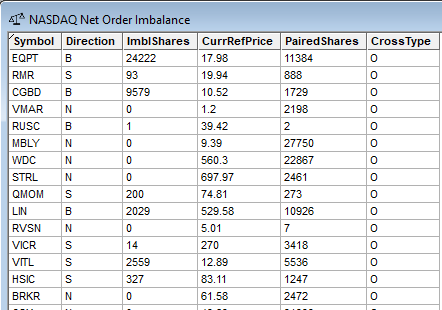
To open the Imbalance window in DAS Trader Pro, click on Quotes then click on Imbalance.
Understanding the Data
| Field | Description |
| Symbol | Security with an active auction imbalance. |
| Direction | Indicates whether the imbalance is Buy or Sell. Possible values: B=Buy S=Sell N=No imbalance O=Insufficient |
| ImblShares | Number of shares not paired at the Current Reference Price. |
| CurrRefPrice | Current Reference Price – The price at which the paired shares are being calculated. |
| PairedShares | The total number of shares that are eligible to be matched at the Current Reference Price. |
| CrossType | O=Open Cross C=Close Cross H= Intra-day Opening Cross for IPO and Halted/Paused securities |
Viewing Imbalance Data in the Montage
Imbalance data can be added to the tickers in the level 1 section of the montage by right clicking and selecting Imbalance data:
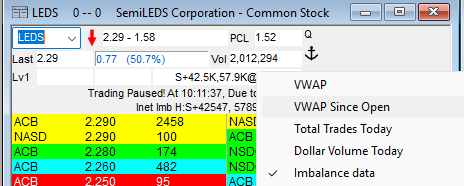
Imbalance data will also display when a symbol is halted. For information on how to interpret the data in the montage, refer to this article.
When Is Imbalance Data Available?
Nasdaq Imbalance:
- Opening Cross between 9:25 am and 9:30 am ET
- Closing Cross between 3:50 pm and 4:00 pm ET
- During certain trading halt reopenings
Arcabook Imbalance:
- Early Opening auction 2:30 am to 3:59 am ET
- Opening auction 8:00 am to 9:29:55 am ET
- Closing auction 3:00 pm to 4:00 pm ET
- During halt auctions
Outside of these auction periods, the Imbalance window will typically remain blank.


